
Live Customization at Events: Queue Management and Guest Flow Best Practices
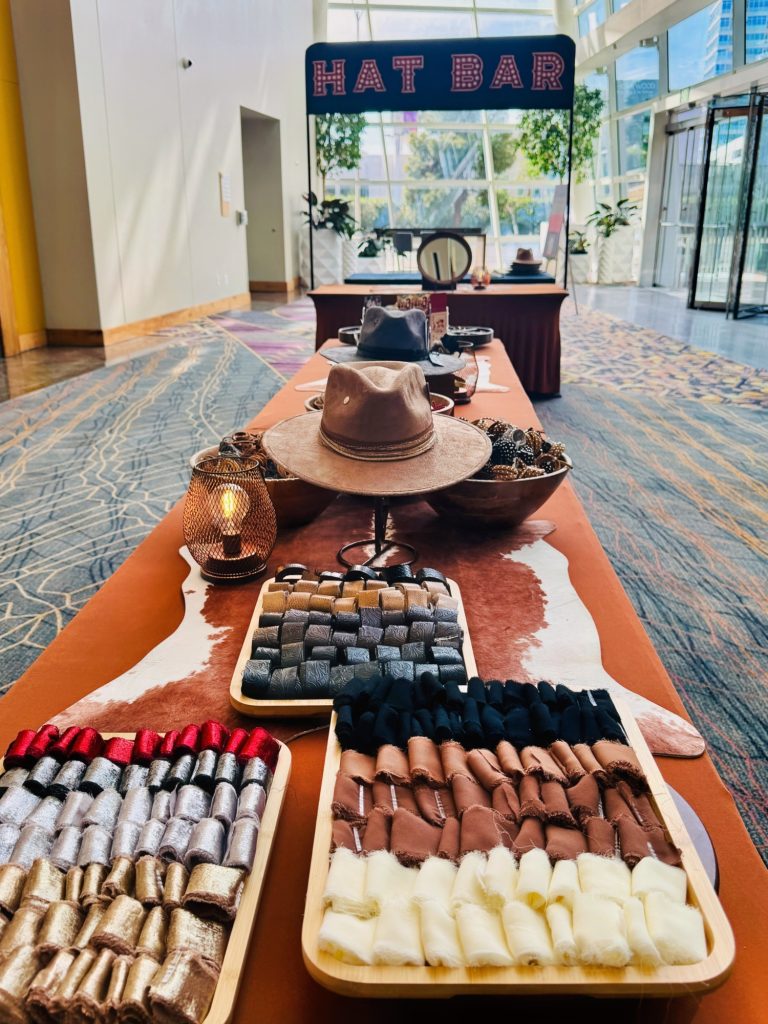
A live customization station can become the highlight of an event, or the place where momentum stalls.
That tension is especially clear with interactive experiences. Guests love watching something personal take shape, whether that is a custom hat, a branded accessory, or a made-on-site keepsake. Yet the more memorable the activation, the greater the risk of a crowd forming around it. People stop to watch. Friends gather. Guests who were only curious decide they want in. Very quickly, a line becomes a cluster, and a cluster becomes a traffic problem.
Strong queue management solves more than waiting time. It protects energy in the room, keeps walkways usable, supports safety, and helps the activation feel polished from start to finish. For event planners, marketers, and hosts, guest flow should be part of the experience design, not an afterthought.
Why live customization creates unique flow challenges
A customization station is not the same as a check-in desk or a coffee pickup line. It has more emotional pull and more decision points. Guests may pause to compare styles, ask questions, watch a friend design something, or take photos before moving on. That means service time is rarely uniform.
This matters because queue friction usually starts long before the line looks long. If each guest needs a few extra moments to choose, approve, personalize, and collect, throughput changes fast. A station serving 30 guests an hour under ideal conditions may drop well below that during a peak rush if the layout or staffing is not built for choice-heavy interactions.
The fix is not to strip out the fun. It is to separate the fun into stages so guests keep moving while still enjoying the process.
Start with throughput, not guesswork
Before choosing stanchions, signage, or software, define how many guests the station can realistically serve per hour. That number should reflect actual service steps, not best-case optimism.
A live customization flow usually includes greeting, product selection, design choices, personalization, finishing, and handoff. If all of that happens in one spot with one staff member, lines build almost immediately. If those steps are split into simple, visible zones, the same activation can feel calm and efficient even during busy windows.
A practical pre-event review should cover a few basics.
- Guest count
- Peak demand periods
- Average service time
- Physical footprint
- Staff-to-station ratio
- Nearby traffic patterns
For event planners, this is where collaboration with the activation partner matters most. A mobile custom hat experience, for example, tends to perform best when capacity is planned around peak moments rather than total attendance. Not every guest arrives at the station evenly across the event. Most want the experience during a short burst, often right after arrival, just before dinner, or when the emcee creates a social cue.
Build the line around the guest decision process
Guests tolerate waiting far better when they can see progress and make choices before they reach the front. That principle is simple, but it changes everything.
If someone reaches the service point and only then starts deciding between styles, colors, patches, and placement, the queue absorbs every second of that indecision. If those choices begin while they are still moving through the line, wait time feels shorter and actual service time drops.
A strong setup often includes these line-side tools:
- sample display pieces
- pricing or package boards
- style menus with visuals
- pre-sorted embellishment options
- clear “start here” signage
This is one reason well-designed activations feel smooth even when they are popular. Guests are not just waiting. They are already participating.
A simple service model that keeps traffic moving
Many event activations improve when they are arranged like a small production line rather than a single service counter. The table below shows a clean way to map the guest path.
| Stage | Guest Action | Common Bottleneck | Best Practice |
|---|---|---|---|
| Entry point | Join line or check in virtually | Confusion about where to start | Use a visible start marker and staff greeter |
| Inspiration zone | Review samples and options | Guests stop in walkway | Place sample boards beside, not inside, main traffic path |
| Selection | Choose product style or base item | Slow decision-making | Limit choices to a curated set for the event |
| Personalization | Pick embellishments, branding, finishes | Too many options at once | Group options by theme, color, or package |
| Build station | Staff assemble or guide design | Service time varies by guest | Keep trained makers focused on production |
| Pickup and photo moment | Guest receives item and shares photos | Finished guests linger in queue area | Create a distinct exit zone away from active line |
This structure does not have to feel rigid. In fact, it usually makes the activation feel more welcoming because guests know what happens next.
It also helps planners match layout to event style. A wedding may call for a softer, more conversational pace. A corporate event may need higher throughput and visible brand integration. A festival may need faster choices, simpler packaging, and stronger wayfinding. The service model can stay consistent while the visual presentation shifts with the audience.
Physical flow matters as much as queue length
A short line in the wrong place can cause more trouble than a long line in the right place.
Customization stations often attract spectators, which means the real space requirement is larger than the queue itself. Guests waiting, guests watching, completed guests taking photos, and passersby all compete for the same footprint unless the area is planned with circulation in mind.
The best placements usually share a few traits. They sit near energy, but not in the center of a main corridor. They have enough depth for a shaped queue. They allow a clean entrance and a separate exit. They also leave room for staff to move behind the station without crossing guest traffic.
When evaluating placement, ask a few blunt questions. Will the line block bar service? Will it cut across a sponsor display? Will a photo moment create a second crowd? If the answer to any of those is yes, the activation needs either more space or a different orientation.
Virtual queues can be a smart release valve
Not every event needs an app-based line, but virtual queueing can be very effective when demand spikes are likely or floor space is limited.
A simple virtual queue lets guests scan a code, enter a name or phone number, and receive a message when their turn is near. That removes the visual stress of a long physical line and gives people time to enjoy the event instead of standing in one place. It is especially useful for trade shows, large corporate events, festivals, and multi-activity receptions where guests want flexibility.
That said, virtual-only systems are not always ideal. Some audiences prefer visible order and face-to-face guidance. Others may ignore text alerts or miss their turn. The strongest approach is often hybrid: a short physical queue for near-term service, paired with a digital waitlist during heavier periods.
The key is choice. Guests should know exactly how to participate, how long the wait is, and what happens next.
Staffing should follow demand, not the original floor plan
A beautiful station can still fail if staffing remains static while traffic changes by the hour. Queue management is an operating discipline, not just a setup decision.
During live service, someone should be watching the line, the service pace, and the surrounding crowd condition in real time. That can be a lead on the activation team, an event producer, or a floor manager with authority to make changes. The point is speed. If a backup appears, action should happen within minutes.
Bobs notes in its foodtruck event checklist that staggered ordering windows, a trimmed rush-hour menu, and a roaming runner role can lift throughput quickly when queues surge—tactics that map cleanly to live customization staffing.
The most useful roles are usually clear and flexible:
- Greeter: directs guests, answers basic questions, and filters casual browsers from committed participants
- Line guide: helps guests make choices before they reach the service point
- Maker or finisher: stays focused on build quality and output
- Float support: jumps in where the queue begins to slow
Cross-training helps here. A staff member who can greet, prep materials, and manage pickup gives the team room to adapt without chaos. This is especially important for interactive stations where guest needs change from one hour to the next.
Communication changes how the wait feels
People can handle a wait. What they dislike is uncertainty, unfairness, and silence.
Good queue communication reduces all three. A clear sign that says “Current wait: about 10 minutes” is far more calming than a vague line with no context. A friendly staff member explaining that guests can choose patches while they wait does more for satisfaction than cutting a minute off service time without saying anything.
Helpful communication can be low-tech or digital, as long as it is timely and consistent.
- Wait time signs: set expectations before guests commit
- Directional messaging: point guests to the correct start point and exit path
- Choice prompts: encourage decisions early, before the service station
- Status updates: tell guests when more capacity is opening or when a short pause is happening
This is also where fairness becomes visible. Separate lines for VIPs, sponsors, or pre-registered guests can work well, but only when they are clearly marked and intentionally managed. Nothing creates friction faster than a line that appears to have hidden rules.
Use technology where it solves a real problem
Real-time dashboards, RFID check-ins, people counters, and mobile alerts can be powerful tools. They are most useful when crowd size, venue scale, or sponsor expectations call for more active control.
At large events, live data can help teams spot a problem before guests feel it. If one entrance lane slows, staff can redirect arrivals. If a branded activation becomes a hotspot, managers can open another lane, add signage, or push updates through an event app. Even simple metrics like queue length, average wait, and guests served per hour can guide better decisions during the event rather than after it.
Still, more technology is not always better. Smaller private events may do just fine with a skilled greeter, a clipboard, and strong station design. The right system is the one the team can operate confidently under pressure.
The metrics worth watching during service
Once the event starts, queue management becomes a live performance. A few simple metrics can keep it grounded.
- Average wait time
- Guests served per hour
- Queue abandonment
- Peak rush windows
- Photo-area dwell time
- Staff response time to backups
These numbers do not need to be complicated to be useful. If wait time suddenly rises, something has changed in either guest behavior or service delivery. If abandonment increases, the line may look unclear, feel too slow, or lack enough information. If the photo area becomes crowded, the activation may need a more defined exit path.
For interactive experiences, there is another metric worth respecting: energy. When guests move through a station with curiosity, confidence, and visible satisfaction, the activation lifts the event around it. When they bunch up, ask where to stand, and hesitate at every step, the room feels less organized even if the line is technically manageable.
That is why queue strategy belongs in creative planning from the start. A live customization moment should feel generous, social, and memorable. With the right guest flow plan, it can stay that way even when demand surges.